Quick Verdict
Canva is a fantastic design tool for individuals and small teams who need to create social media graphics, presentations, and basic marketing materials. Its drag-and-drop editor and template library make design accessible to non-designers. If you need to whip up an Instagram post or a quick flyer for yourself, Canva Pro at $15/month is hard to beat.
Phantom is built for a fundamentally different user - agency owners and creative freelancers who manage multiple clients and need more than just design. Phantom combines AI-powered content generation (describe it, get a 4K creative in seconds), lead discovery with 0-100 opportunity scoring, personalized outreach that averages a 28% reply rate, a built-in CRM pipeline, AI content calendars, and a freelancer marketplace with escrow-protected payments. It is not a design tool with business features bolted on. It is a business system with AI content generation built in.
The Core Difference
This is not a comparison between two design tools. Canva is a design tool. Phantom is a business operating system for creative professionals. Comparing them feature-for-feature on design alone misses the point entirely.
The real question is: are you a hobbyist who needs to make things look pretty, or are you a business owner who needs to find clients, create content, send outreach, manage deals, and get paid - all from one place?
If the answer is the latter, keep reading.
Feature Comparison
| Feature | Phantom | Canva Pro |
|---|---|---|
| AI-Generated Content | Yes - describe and download | No - manual drag-and-drop design |
| Per-Client Brand Kits | Yes - full brand kits per client (colors, fonts, logos) | Basic Brand Kit (limited on Pro) |
| 4K Resolution Output | Yes - automatic 4K rendering | No - max 5000x5000 manual export |
| Lead Generation | Yes - AI finds businesses, scores 0-100, scrapes contacts | No |
| Outreach System | Yes - AI-written personalized emails, 28% reply rate | No |
| Content Calendar | Yes - AI-generated 30-day plans with niche hooks | No |
| CRM / Pipeline | Yes - built-in deal pipeline | No |
| Marketplace | Yes - sell services, escrow-protected payments | No |
| Mobile App | Yes - native iOS app | Yes - iOS and Android |
| Starting Price | From $49/mo | $15/mo |
What Is Canva?
Canva is a browser-based graphic design tool used by over 170 million people worldwide. It democratized design by giving non-designers access to thousands of templates, a drag-and-drop editor, stock photos, icons, and basic animation tools. Canva Pro ($15/month) adds brand kits, background remover, Magic Resize, and premium templates.
For its intended purpose - making design accessible - Canva is excellent. Need a quick Instagram story? A presentation for a team meeting? A birthday card? Canva handles all of that effortlessly.
But Canva was built for individual creators, not for agency operators managing a pipeline of clients. It has no lead generation, no outreach tools, no CRM, no content strategy engine, and no marketplace. It is a hammer - a very good hammer - but when you need a full toolbox, a hammer alone will not cut it.
What Is Phantom?
Phantom is an AI-powered business platform for agencies and creative freelancers. It combines six core capabilities that typically require six separate subscriptions into a single dashboard.
AI Content Generation: Instead of dragging and dropping templates, you describe what you need in plain English. "Create a testimonial post for a dental practice with a dark blue glassmorphism style." Phantom's AI generates a unique, branded creative and renders it at 4K resolution. No templates. No design skills required. Every output is original.
Lead Discovery: Phantom's AI crawls and analyzes local businesses across 55+ data points - website quality, Google reviews, Instagram engagement, ad activity, mobile optimization, and more. Each lead gets an opportunity score from 0 to 100, telling you exactly which businesses are most likely to buy your services.
Smart Outreach: For every lead it discovers, Phantom writes personalized outreach referencing specific pain points it found - a bad Google rating, an inactive Instagram, a slow website. These are not template emails with merge fields. They are genuinely personalized messages that average a 28% reply rate.
Content Calendars: Phantom's AI generates full 30-day content calendars tailored to your client's niche, with post ideas, hooks, hashtag strategies, and optimal posting times. No more staring at a blank calendar wondering what to post next.
Pipeline Management: A built-in CRM tracks every deal from first contact through close. No need for a separate tool. Manage your entire sales process alongside your content and outreach.
Freelancer Marketplace: Buy and sell agency services with escrow-protected payments. Need a logo designer for a client project? Find one on Phantom's marketplace. Have excess capacity? List your services and pick up work from other agency owners.
What Phantom Generates
Forget templates. Phantom creates unique, branded creatives from a text description. Here are real examples generated in seconds:
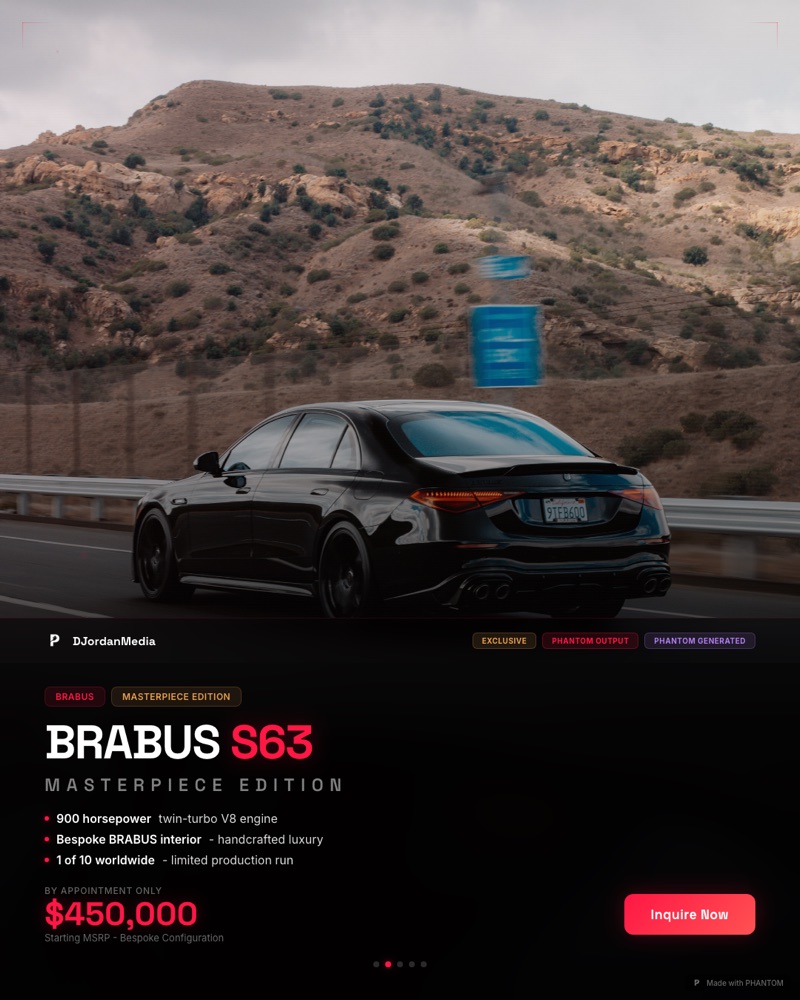

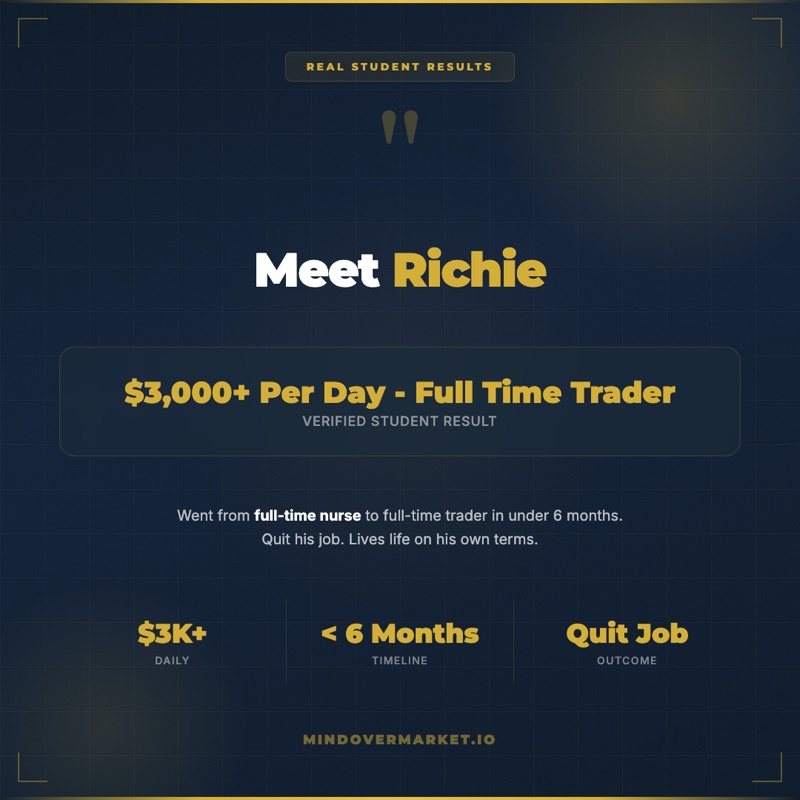
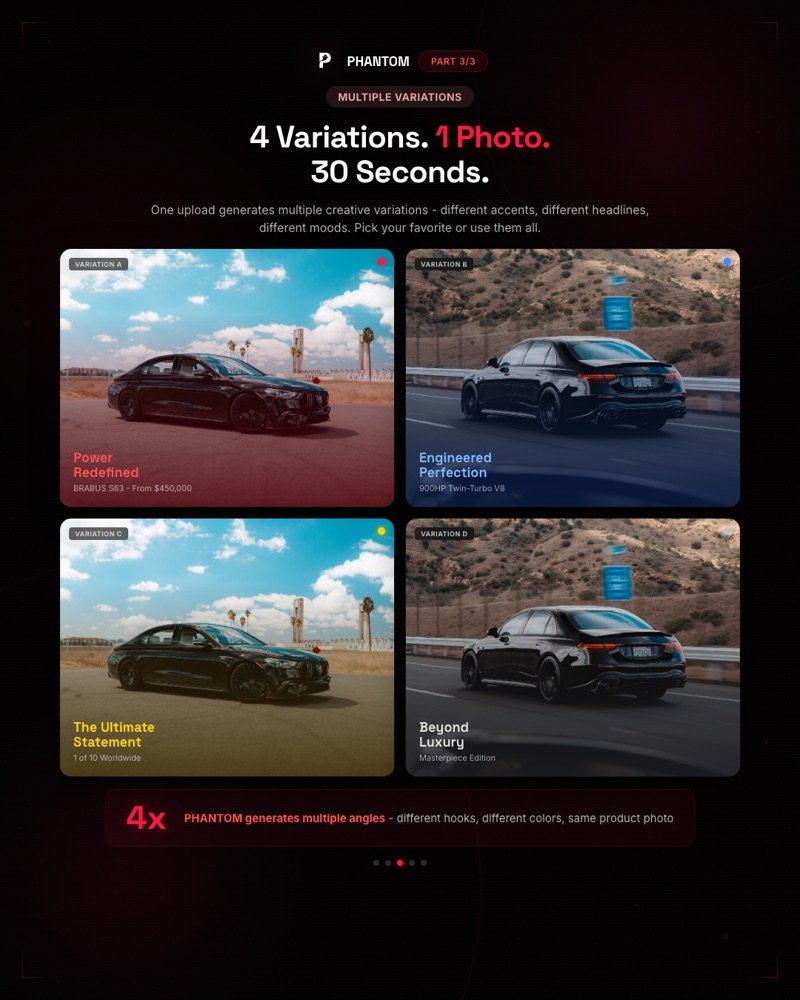
Real creatives generated by Phantom in seconds. No templates. No drag-and-drop. Just describe what you need.
Key Differences
1. Templates vs. AI Generation
Canva's entire model revolves around templates. You browse thousands of pre-made designs, pick one that is close to what you want, then customize it - swap colors, change text, move elements around. The result is a modified template. Your competitor down the street might be using the same one.
Phantom skips the template entirely. You describe what you want: "A 4K Instagram carousel for a luxury auto detailing brand, dark theme, glassmorphism card style, showcasing before/after results." The AI generates it from scratch. Every output is unique. There is no template library because there does not need to be one.
2. Design Tool vs. Business System
Canva starts and ends at the design phase. You create something, export it, and then use other tools to find clients, send outreach, manage projects, and track revenue. Canva does not know who your clients are, what services you offer, or how your pipeline looks.
Phantom wraps content generation inside a full business operating system. You find leads, assess their needs, generate content proposals, send outreach, close deals, and deliver work - all without leaving the dashboard. The content generation is not an isolated feature. It is connected to your leads, your clients, and your pipeline.
3. Manual Effort vs. AI Automation
A typical Canva workflow for a social media agency looks like this: open Canva, browse templates, customize for Client A, export, upload to scheduling tool, repeat for Client B, then Client C, then Client D. For 10 clients posting 4 times per week, that is 40 manual design sessions per week.
A Phantom workflow: describe the content style for each client, generate a batch of creatives, review, and download. The AI handles layout decisions, typography pairing, color harmony, and 4K rendering. What took 40 sessions in Canva takes a fraction of the time in Phantom because the AI does the heavy lifting.
4. Finding Clients vs. Just Serving Them
This is where the comparison breaks wide open. Canva has zero tools for acquiring new business. It assumes you already have clients and just need to make graphics for them. If your pipeline dries up, Canva cannot help you refill it.
Phantom's lead discovery engine actively finds businesses that need your services. It scores them, finds their contact information, identifies their pain points, and writes personalized outreach for you. Agency owners using Phantom report finding 340+ qualified leads in under 12 minutes. That is not a marketing claim - it is the average discovery speed across all users.
The Math: Tool Stack vs. All-in-One
Running an agency with Canva as your design tool means stacking subscriptions to cover everything else:
| Need | Separate Tools | Monthly Cost |
|---|---|---|
| Design / Content | Canva Pro | $15/mo |
| Lead Database | Apollo.io or similar | $99/mo |
| Email Outreach | Instantly, Smartlead, etc. | $97/mo |
| CRM / Pipeline | HubSpot, Pipedrive, etc. | $59/mo |
| Marketplace Fees | Fiverr, Upwork commissions | ~$50/mo |
| Total | $320+/mo |
Phantom replaces all five tools for $49/month on the Starter plan. That is less than half the cost, with zero context-switching between platforms, zero data syncing headaches, and one login instead of five. The Hunter plan at $349/month includes 2,000 lead discoveries and advanced features. The Operator plan at $697/month unlocks 3,500 discoveries, team features, and white-label capabilities.
And that $320+ estimate is conservative. It does not account for the hours spent manually researching leads, writing personalized outreach by hand, or switching between five different dashboards every day. Time is money, and Phantom saves both.
Pricing Comparison
| Plan | Phantom | Canva |
|---|---|---|
| Free | 5-day free trial on all plans | Free plan (limited templates + features) |
| Entry | Scout - $149/mo (500 discoveries + full platform) | Pro - $15/mo (templates + brand kit) |
| Mid | Hunter - $349/mo (2,000 discoveries + marketplace) | Teams - $10/mo per person |
| Top | Operator - $697/mo (5,000 discoveries + white-label) | Enterprise - custom pricing |
| Includes | AI content + lead gen + outreach + CRM + marketplace | Design editor + templates + stock assets |
Yes, Phantom costs more per month than Canva Pro. It should. Canva is a design tool. Phantom is an entire business platform. Comparing their prices is like comparing the cost of a calculator to the cost of a full accounting suite - they serve fundamentally different purposes at fundamentally different scales.
When to Use Canva
Canva is the right choice if:
- You are working on personal projects - social media posts for your own accounts, school presentations, invitations, or hobby content
- You need one-off designs and do not run a creative business with multiple clients
- You are not selling services to businesses and do not need lead generation, outreach, or pipeline tools
- You prefer a hands-on design process where you manually place every element exactly where you want it
- Your budget is tight and you need the cheapest possible design tool for basic graphics
Canva is genuinely excellent for these use cases. There is no reason to overcomplicate things if all you need is a good design editor.
When to Use Phantom
Phantom is the right choice if:
- You are an agency owner or creative freelancer managing multiple clients who each need branded content
- You want AI-generated content that you describe in plain English instead of manually designing every piece
- You need to find new clients - not just serve existing ones - with AI lead discovery and scoring
- You want one platform for content generation, lead finding, outreach, pipeline management, and payments instead of five separate tools
- You need 4K resolution output that looks premium without spending 30 minutes per design
- You want AI content calendars that generate 30-day plans tailored to each client's niche
- You want access to a freelancer marketplace where you can sell excess capacity or hire specialists for client projects
If your workflow currently looks like Canva + lead tool + outreach tool + CRM + marketplace, Phantom collapses all of that into a single dashboard. See our use case pages for specific breakdowns by service type and industry.
The Verdict
Canva and Phantom are not really competitors. They serve different people at different stages. Canva is a design tool for everyone. Phantom is a business system for agency owners and creative professionals who need to find clients, create content, close deals, and grow their revenue - all from one place. If you are still manually designing templates in Canva while juggling three other tools to run your agency, try Phantom free for 5 days and see what it looks like when everything works together.
Frequently Asked Questions
Can Phantom replace Canva?
For agency owners and creative freelancers managing client work, yes. Phantom replaces Canva's content creation with AI-generated 4K creatives, and adds lead generation, outreach, pipeline management, and a marketplace on top. You describe what you need and Phantom generates it - no templates, no drag-and-drop. For personal DIY projects where you want hands-on design control, Canva is still a solid option.
Is Phantom harder to learn than Canva?
Different, not harder. Canva requires you to learn its editor interface, find the right template, customize layouts, adjust spacing, and export at the right dimensions. Phantom requires you to describe what you want in plain English. The AI handles layout, typography, color harmony, and rendering. Most users generate their first 4K creative within 2 minutes of signing up. The learning curve is actually shorter because there is no editor to master.
Can I use both Canva and Phantom together?
You can, but most users find they do not need to. Phantom covers content generation, lead finding, outreach, pipeline management, and marketplace services - the entire agency workflow. Some users keep Canva around for quick personal edits or one-off designs that fall outside their agency work, but for client-facing content and business operations, Phantom handles everything.
What about Canva's massive template library?
Canva's template library is enormous, and that is both its strength and its weakness. Strength: there is always a starting point. Weakness: your competitors have access to the exact same templates. When three social media agencies in the same city are all using the same Canva template for their clients' Instagram feeds, nobody stands out. Phantom generates unique creatives from scratch based on your description, brand kit, and client requirements. Every output is one-of-a-kind, rendered at 4K resolution, and impossible for a competitor to duplicate because it was never a template to begin with.